
blog初建
快捷导航
环境
- windows11
- node version 15.13.0
- hexo version 6.3.0
- butterfly version 4.5.1
- blog目录结构预览
1 | blog |
blog本地搭建
安装hexo
镜像下载node.js
更换npm镜像
1
npm config set registry https://mirrors.huaweicloud.com/repository/npm/
检验镜像
1
npm config get registry
全局安装hexo
1
npm install -g hexo@6.3.0
或者局部安装hexo1
npm install hexo@6.3.0 --save
初始化blog, 同时建了个文件夹
1
hexo init blog
看看此时hexo版本
1
2
cd blog
hexo -v不对的话修改hexo版本
1
npm install hexo@6.3.0 --save
启动
1
hexo s
此时可以在
http://localhost:4000/看到本地搭建结果
安装butterfly主题
安装指定版本
butterfly1
git clone -b 4.5.1 https://github.com/jerryc127/hexo-theme-butterfly.git themes/butterfly
修改文件
_config.yml1
2
3
4# Extensions
## Plugins: https://hexo.io/plugins/
## Themes: https://hexo.io/themes/
theme: butterfly启动
1
hexo cl;hexo s
blog部署到外网
- 这样别人也可以访问, 不需要则跳过
部署到GitHub Pages
在github创建好repository:
<username>.github.io
(也可以设置别的,但是后来麻烦!!!)修改blog文件夹下的
_config.yml1
2
3
4deploy:
type: git
repo: https://github.com/<username>/<username.github.io>
branch: gh-pages进入
blog文件夹1
2npm install hexo-deployer-git --save
hexo clean | hexo deploy到这里就已经部署到github了,然后在Setting中设置好Pages,浏览器中输入
https://<username>.github.io查看部署结果
此时可能出现登入github界面,如果下次不想登入,需在github里的Settings里填写SSH key
1 | git config --global user.name "~~~" |
1 | git config --global user.email "~~~~~@~~~" |
1 | ssh-keygen -t rsa -C "~~~" |
然后在github里的Settings里填写SSH key
1 | ssh -T git@github.com |
注意不要一直回车,有次输入yes
- 可能需要的
1
git config --global http.sslverify false
部署到其它免费托管网站
blog部署到局域网
同一个路由器下或同一个网段可访问, 不需要则跳过
安装
hexo-server1
npm install hexo-server --save
启动
1
hexo server -i 192.168.88.66 -p 12345
此时在浏览器输入:
192.168.88.66:12345可以正常访问, 但别的设备可能不可以, 需要在设置允许应用通过防火墙中勾选Node.js JavaScript Runtime
更好的免费外网部署
使用netlify和cloudflare分别部署
使
***.netlify.app重定向到***.pages.dev, 因cloudflare免费分析网站流量新建文件
/source/netlify.toml, 写入1
2
3
4
5[[redirects]]
from = "https://lynvtiki.netlify.app/"
to = "https://lynvtiki.pages.dev/"
status = 301
force = true修改文件
_config.butterfly.yml, 注意在cloudflare获取token, 如下图, 然后把token填入cloudflare_analytics1
2
3# Cloudflare Analytics
# https://www.cloudflare.com/zh-tw/web-analytics/
cloudflare_analytics: af2a6******

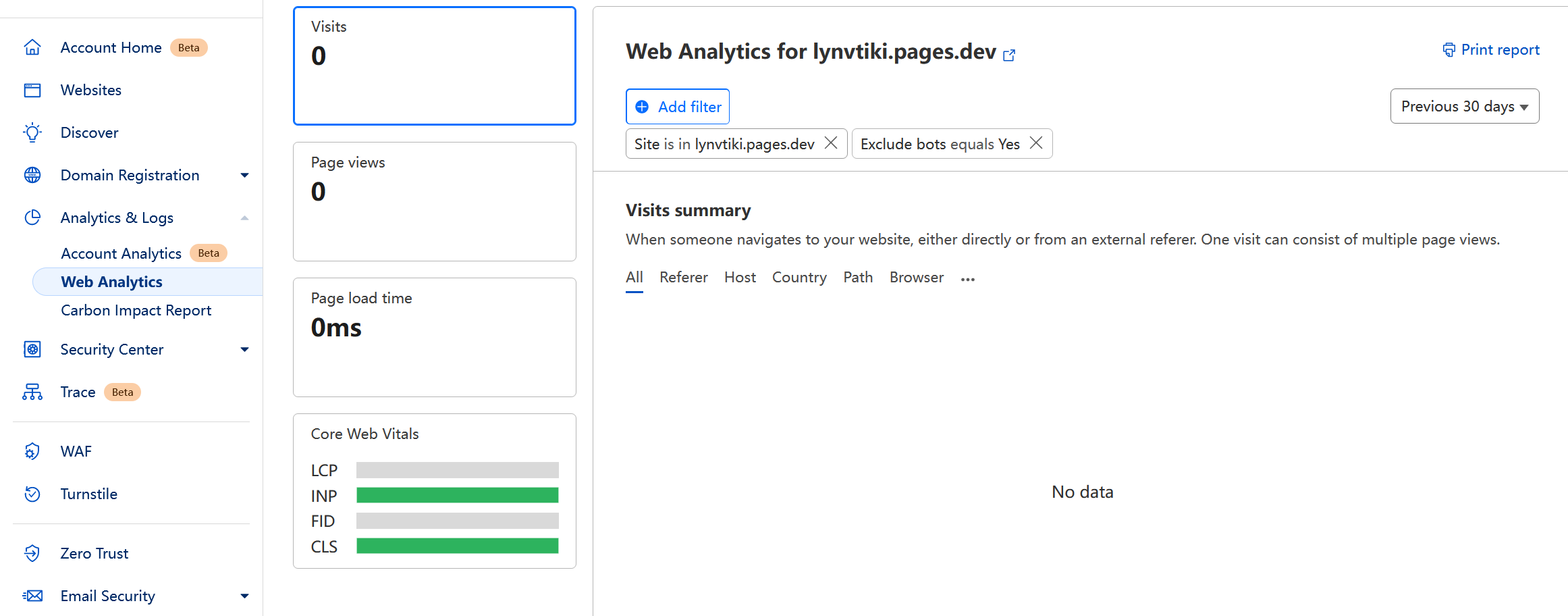
- 最后等一会登入cloudflare就能看到网站访问数据了, 如下图说明还得等一会
更舒服的体验
使用git进行版本管理
1 | git init |
1 | git add . |
1 | git commit -am "." |
1 | git remote add origin [url] |
1 | git push origin master |
使用github action 节约时间
主要是
hexo clean | hexo d现在太慢了, 有的时候因为奇奇怪怪的原因报错先进入github网站, 依次
Settings -> Developer settings -> PersonaI access tokens -> Tokens (classic) -> Generate new token, 然后选择No expiration, 勾选repo和workflow, 注意token只会显示一次然后回到blog仓库, 依次
Settings-> Secrets and variables -> Actions -> New repository secret, 注意记住设置好的名字(例如Deploy), 待会编辑pages.yml时需要(github_token: ${{ secrets.Deploy }})然后在博客根目录创建
.github/workflows/pages.yml, 复制以下内容, 并根据node --version的结果更改node 版本
1 | name: Pages |
- 最后执行如下代码, 也是以后只要执行的
1 | git add . | git commit -am "." | git push origin master |
- 然后在github action 里可以看到branch
gh-pages自动更新了
使用模版写 md
1 | vim scaffolds/post.md |
1 |
|
使用快捷自启脚本
1 | vim run.bat |
1 | if "%1"=="hide" goto CmdBegin |
更好的文章操作体验
安装Latex插件
1 | npm install hexo-filter-mathjax --save |
- 在需要的文章上面
Front-matter加上mathjax: true即可使用
安装文章置顶插件
1 | npm uninstall hexo-generator-index --save |
1 | npm install hexo-generator-index-pin-top --save |
- 在需要置顶的文章上
Front-matter加入top: true/数字即可,数字越大,文章越靠前
安装隐藏文章插件
安装
1
npm install hexo-hide-posts --save
修改
_config.yml, 添加1
2
3
4
5
6
7
8
9
10
11
12
13
14
15
16
17hide_posts:
# 是否启用 hexo-hide-posts
enable: true
# 隐藏文章的 front-matter 标识,也可以改成其他你喜欢的名字
filter: hidden
# 为隐藏的文章添加 noindex meta 标签,阻止搜索引擎收录
noindex: true
# 设置白名单,白名单中的 generator 可以访问隐藏文章
# 常见的 generators 有:index, tag, category, archive, sitemap, feed, etc.
# allowlist_generators: []
# 设置黑名单,黑名单中的 generator 不可以访问隐藏文章
# 如果同时设置了黑名单和白名单,白名单的优先级更高
# blocklist_generators: ['*']在需要隐藏的文章上面
Front-matter加入hidden: true虽然隐藏了, 但也可且只能通过链接直接访问
可通过命令
hexo hidden:list来获取当前所有的已隐藏文章列表如果要绝对隐藏文章, 那在
Front-matter即文章上面直接加上published: false
使用唯一链接
修改
_config.yml文件1
2
3
4
5
6
7
8
9# permalink: :year/:month/:day/:title/
# permalink: posts/:abbrlink/
# permalink: posts/:abbrlink.html/
# permalink: :abbrlink.html/
permalink: :abbrlink.hmd/
permalink_defaults:
pretty_urls:
trailing_index: true # Set to false to remove trailing 'index.html' from permalinks
trailing_html: true # Set to false to remove trailing '.html' from permalinks之后可以在文章上面
Front-matter添加abbrlink: 1, 自定义文章链接注意: 如果首页图片加载不出来, 经
F12验证, 那是因为permalink: :abbrlink.hmd/忘加后面的/了
安装本地搜索插件
安装插件
1
npm install hexo-generator-search --save
修改
config.yml, 添加如下代码1
2
3
4search:
path: search.xml
field: post
content: true修改
_config.butterfly.yml1
2local_search:
enable: true
安装文章加密插件
安装
1
npm install --save hexo-blog-encrypt
文章上面添加
1
2
3---
password: pwd
---_config.yml添加1
2
3
4
5
6
7
8
9
10# Security
encrypt: # hexo-blog-encrypt
abstract: 有东西被加密了, 请输入密码查看.
message: 您好, 这里需要密码.
# tags:
# - {name: tagName, password: 密码A}
# - {name: tagName, password: 密码B}
theme: xray
wrong_pass_message: 抱歉, 这个密码看着不太对, 请再试试.
wrong_hash_message: 抱歉, 这个文章不能被校验, 不过您还是能看看解密后的内容.
更安全的体验
cdn资源本地化
- 注意
butterfly版本4.5.1
修改
_config.butterfly.yml文件1
2
3
4
5
6
7
8
9
10CDN:
# The CDN provider of internal scripts (主題內部 js 的 cdn 配置)
# option: local/jsdelivr/unpkg/cdnjs/custom
# Dev version can only choose. ( dev版的主題只能設置為 local )
internal_provider: local
# The CDN provider of third party scripts (第三方 js 的 cdn 配置)
# option: local/jsdelivr/unpkg/cdnjs/custom
# when set it to local, you need to install hexo-butterfly-extjs
third_party_provider: local安装
1
npm install hexo-butterfly-extjs@1.3.4 --save --force
这时会输出以下部分内容, 不用理它, 这是因为
butterfly版本4.5.1较低, 若运行npm audit fix --force, 则hexo-butterfly-extjs版本会变为1.0.0, 然后会导致blog加载不了hexo-butterfly-extjs中lib下的本地资源css和js1
2
3
4
5
6
7To address issues that do not require attention, run:
npm audit fix
To address all issues (including breaking changes), run:
npm audit fix --force
Run `npm audit` for details.删除
node_modules文件夹重新安装
1
npm i
这时先启动一下
1
hexo cl;hexo s
大概率输出如下内容
1
2WARN Please reinstall hexo-butterfly-extjs.
WARN The file does not exist: typed.js/lib/typed.min.js新建文件
node_modules/typed.js/lib/typed.min.js, 写入1
2
3
4
5
6
7
8
9
10
11/*!
*
* typed.js - A JavaScript Typing Animation Library
* Author: Matt Boldt <me@mattboldt.com>
* Version: v2.0.12
* Url: https://github.com/mattboldt/typed.js
* License(s): MIT
*
*/
(function(t,e){"object"==typeof exports&&"object"==typeof module?module.exports=e():"function"==typeof define&&define.amd?define([],e):"object"==typeof exports?exports.Typed=e():t.Typed=e()})(this,function(){return function(t){function e(n){if(s[n])return s[n].exports;var i=s[n]={exports:{},id:n,loaded:!1};return t[n].call(i.exports,i,i.exports,e),i.loaded=!0,i.exports}var s={};return e.m=t,e.c=s,e.p="",e(0)}([function(t,e,s){"use strict";function n(t,e){if(!(t instanceof e))throw new TypeError("Cannot call a class as a function")}Object.defineProperty(e,"__esModule",{value:!0});var i=function(){function t(t,e){for(var s=0;s<e.length;s++){var n=e[s];n.enumerable=n.enumerable||!1,n.configurable=!0,"value"in n&&(n.writable=!0),Object.defineProperty(t,n.key,n)}}return function(e,s,n){return s&&t(e.prototype,s),n&&t(e,n),e}}(),r=s(1),o=s(3),a=function(){function t(e,s){n(this,t),r.initializer.load(this,s,e),this.begin()}return i(t,[{key:"toggle",value:function(){this.pause.status?this.start():this.stop()}},{key:"stop",value:function(){this.typingComplete||this.pause.status||(this.toggleBlinking(!0),this.pause.status=!0,this.options.onStop(this.arrayPos,this))}},{key:"start",value:function(){this.typingComplete||this.pause.status&&(this.pause.status=!1,this.pause.typewrite?this.typewrite(this.pause.curString,this.pause.curStrPos):this.backspace(this.pause.curString,this.pause.curStrPos),this.options.onStart(this.arrayPos,this))}},{key:"destroy",value:function(){this.reset(!1),this.options.onDestroy(this)}},{key:"reset",value:function(){var t=arguments.length<=0||void 0===arguments[0]||arguments[0];clearInterval(this.timeout),this.replaceText(""),this.cursor&&this.cursor.parentNode&&(this.cursor.parentNode.removeChild(this.cursor),this.cursor=null),this.strPos=0,this.arrayPos=0,this.curLoop=0,t&&(this.insertCursor(),this.options.onReset(this),this.begin())}},{key:"begin",value:function(){var t=this;this.options.onBegin(this),this.typingComplete=!1,this.shuffleStringsIfNeeded(this),this.insertCursor(),this.bindInputFocusEvents&&this.bindFocusEvents(),this.timeout=setTimeout(function(){t.currentElContent&&0!==t.currentElContent.length?t.backspace(t.currentElContent,t.currentElContent.length):t.typewrite(t.strings[t.sequence[t.arrayPos]],t.strPos)},this.startDelay)}},{key:"typewrite",value:function(t,e){var s=this;this.fadeOut&&this.el.classList.contains(this.fadeOutClass)&&(this.el.classList.remove(this.fadeOutClass),this.cursor&&this.cursor.classList.remove(this.fadeOutClass));var n=this.humanizer(this.typeSpeed),i=1;return this.pause.status===!0?void this.setPauseStatus(t,e,!0):void(this.timeout=setTimeout(function(){e=o.htmlParser.typeHtmlChars(t,e,s);var n=0,r=t.substr(e);if("^"===r.charAt(0)&&/^\^\d+/.test(r)){var a=1;r=/\d+/.exec(r)[0],a+=r.length,n=parseInt(r),s.temporaryPause=!0,s.options.onTypingPaused(s.arrayPos,s),t=t.substring(0,e)+t.substring(e+a),s.toggleBlinking(!0)}if("`"===r.charAt(0)){for(;"`"!==t.substr(e+i).charAt(0)&&(i++,!(e+i>t.length)););var u=t.substring(0,e),l=t.substring(u.length+1,e+i),c=t.substring(e+i+1);t=u+l+c,i--}s.timeout=setTimeout(function(){s.toggleBlinking(!1),e>=t.length?s.doneTyping(t,e):s.keepTyping(t,e,i),s.temporaryPause&&(s.temporaryPause=!1,s.options.onTypingResumed(s.arrayPos,s))},n)},n))}},{key:"keepTyping",value:function(t,e,s){0===e&&(this.toggleBlinking(!1),this.options.preStringTyped(this.arrayPos,this)),e+=s;var n=t.substr(0,e);this.replaceText(n),this.typewrite(t,e)}},{key:"doneTyping",value:function(t,e){var s=this;this.options.onStringTyped(this.arrayPos,this),this.toggleBlinking(!0),this.arrayPos===this.strings.length-1&&(this.complete(),this.loop===!1||this.curLoop===this.loopCount)||(this.timeout=setTimeout(function(){s.backspace(t,e)},this.backDelay))}},{key:"backspace",value:function(t,e){var s=this;if(this.pause.status===!0)return void this.setPauseStatus(t,e,!1);if(this.fadeOut)return this.initFadeOut();this.toggleBlinking(!1);var n=this.humanizer(this.backSpeed);this.timeout=setTimeout(function(){e=o.htmlParser.backSpaceHtmlChars(t,e,s);var n=t.substr(0,e);if(s.replaceText(n),s.smartBackspace){var i=s.strings[s.arrayPos+1];i&&n===i.substr(0,e)?s.stopNum=e:s.stopNum=0}e>s.stopNum?(e--,s.backspace(t,e)):e<=s.stopNum&&(s.arrayPos++,s.arrayPos===s.strings.length?(s.arrayPos=0,s.options.onLastStringBackspaced(),s.shuffleStringsIfNeeded(),s.begin()):s.typewrite(s.strings[s.sequence[s.arrayPos]],e))},n)}},{key:"complete",value:function(){this.options.onComplete(this),this.loop?this.curLoop++:this.typingComplete=!0}},{key:"setPauseStatus",value:function(t,e,s){this.pause.typewrite=s,this.pause.curString=t,this.pause.curStrPos=e}},{key:"toggleBlinking",value:function(t){this.cursor&&(this.pause.status||this.cursorBlinking!==t&&(this.cursorBlinking=t,t?this.cursor.classList.add("typed-cursor--blink"):this.cursor.classList.remove("typed-cursor--blink")))}},{key:"humanizer",value:function(t){return Math.round(Math.random()*t/2)+t}},{key:"shuffleStringsIfNeeded",value:function(){this.shuffle&&(this.sequence=this.sequence.sort(function(){return Math.random()-.5}))}},{key:"initFadeOut",value:function(){var t=this;return this.el.className+=" "+this.fadeOutClass,this.cursor&&(this.cursor.className+=" "+this.fadeOutClass),setTimeout(function(){t.arrayPos++,t.replaceText(""),t.strings.length>t.arrayPos?t.typewrite(t.strings[t.sequence[t.arrayPos]],0):(t.typewrite(t.strings[0],0),t.arrayPos=0)},this.fadeOutDelay)}},{key:"replaceText",value:function(t){this.attr?this.el.setAttribute(this.attr,t):this.isInput?this.el.value=t:"html"===this.contentType?this.el.innerHTML=t:this.el.textContent=t}},{key:"bindFocusEvents",value:function(){var t=this;this.isInput&&(this.el.addEventListener("focus",function(e){t.stop()}),this.el.addEventListener("blur",function(e){t.el.value&&0!==t.el.value.length||t.start()}))}},{key:"insertCursor",value:function(){this.showCursor&&(this.cursor||(this.cursor=document.createElement("span"),this.cursor.className="typed-cursor",this.cursor.setAttribute("aria-hidden",!0),this.cursor.innerHTML=this.cursorChar,this.el.parentNode&&this.el.parentNode.insertBefore(this.cursor,this.el.nextSibling)))}}]),t}();e["default"]=a,t.exports=e["default"]},function(t,e,s){"use strict";function n(t){return t&&t.__esModule?t:{"default":t}}function i(t,e){if(!(t instanceof e))throw new TypeError("Cannot call a class as a function")}Object.defineProperty(e,"__esModule",{value:!0});var r=Object.assign||function(t){for(var e=1;e<arguments.length;e++){var s=arguments[e];for(var n in s)Object.prototype.hasOwnProperty.call(s,n)&&(t[n]=s[n])}return t},o=function(){function t(t,e){for(var s=0;s<e.length;s++){var n=e[s];n.enumerable=n.enumerable||!1,n.configurable=!0,"value"in n&&(n.writable=!0),Object.defineProperty(t,n.key,n)}}return function(e,s,n){return s&&t(e.prototype,s),n&&t(e,n),e}}(),a=s(2),u=n(a),l=function(){function t(){i(this,t)}return o(t,[{key:"load",value:function(t,e,s){if("string"==typeof s?t.el=document.querySelector(s):t.el=s,t.options=r({},u["default"],e),t.isInput="input"===t.el.tagName.toLowerCase(),t.attr=t.options.attr,t.bindInputFocusEvents=t.options.bindInputFocusEvents,t.showCursor=!t.isInput&&t.options.showCursor,t.cursorChar=t.options.cursorChar,t.cursorBlinking=!0,t.elContent=t.attr?t.el.getAttribute(t.attr):t.el.textContent,t.contentType=t.options.contentType,t.typeSpeed=t.options.typeSpeed,t.startDelay=t.options.startDelay,t.backSpeed=t.options.backSpeed,t.smartBackspace=t.options.smartBackspace,t.backDelay=t.options.backDelay,t.fadeOut=t.options.fadeOut,t.fadeOutClass=t.options.fadeOutClass,t.fadeOutDelay=t.options.fadeOutDelay,t.isPaused=!1,t.strings=t.options.strings.map(function(t){return t.trim()}),"string"==typeof t.options.stringsElement?t.stringsElement=document.querySelector(t.options.stringsElement):t.stringsElement=t.options.stringsElement,t.stringsElement){t.strings=[],t.stringsElement.style.display="none";var n=Array.prototype.slice.apply(t.stringsElement.children),i=n.length;if(i)for(var o=0;o<i;o+=1){var a=n[o];t.strings.push(a.innerHTML.trim())}}t.strPos=0,t.arrayPos=0,t.stopNum=0,t.loop=t.options.loop,t.loopCount=t.options.loopCount,t.curLoop=0,t.shuffle=t.options.shuffle,t.sequence=[],t.pause={status:!1,typewrite:!0,curString:"",curStrPos:0},t.typingComplete=!1;for(var o in t.strings)t.sequence[o]=o;t.currentElContent=this.getCurrentElContent(t),t.autoInsertCss=t.options.autoInsertCss,this.appendAnimationCss(t)}},{key:"getCurrentElContent",value:function(t){var e="";return e=t.attr?t.el.getAttribute(t.attr):t.isInput?t.el.value:"html"===t.contentType?t.el.innerHTML:t.el.textContent}},{key:"appendAnimationCss",value:function(t){var e="data-typed-js-css";if(t.autoInsertCss&&(t.showCursor||t.fadeOut)&&!document.querySelector("["+e+"]")){var s=document.createElement("style");s.type="text/css",s.setAttribute(e,!0);var n="";t.showCursor&&(n+="\n .typed-cursor{\n opacity: 1;\n }\n .typed-cursor.typed-cursor--blink{\n animation: typedjsBlink 0.7s infinite;\n -webkit-animation: typedjsBlink 0.7s infinite;\n animation: typedjsBlink 0.7s infinite;\n }\n @keyframes typedjsBlink{\n 50% { opacity: 0.0; }\n }\n @-webkit-keyframes typedjsBlink{\n 0% { opacity: 1; }\n 50% { opacity: 0.0; }\n 100% { opacity: 1; }\n }\n "),t.fadeOut&&(n+="\n .typed-fade-out{\n opacity: 0;\n transition: opacity .25s;\n }\n .typed-cursor.typed-cursor--blink.typed-fade-out{\n -webkit-animation: 0;\n animation: 0;\n }\n "),0!==s.length&&(s.innerHTML=n,document.body.appendChild(s))}}}]),t}();e["default"]=l;var c=new l;e.initializer=c},function(t,e){"use strict";Object.defineProperty(e,"__esModule",{value:!0});var s={strings:["These are the default values...","You know what you should do?","Use your own!","Have a great day!"],stringsElement:null,typeSpeed:0,startDelay:0,backSpeed:0,smartBackspace:!0,shuffle:!1,backDelay:700,fadeOut:!1,fadeOutClass:"typed-fade-out",fadeOutDelay:500,loop:!1,loopCount:1/0,showCursor:!0,cursorChar:"|",autoInsertCss:!0,attr:null,bindInputFocusEvents:!1,contentType:"html",onBegin:function(t){},onComplete:function(t){},preStringTyped:function(t,e){},onStringTyped:function(t,e){},onLastStringBackspaced:function(t){},onTypingPaused:function(t,e){},onTypingResumed:function(t,e){},onReset:function(t){},onStop:function(t,e){},onStart:function(t,e){},onDestroy:function(t){}};e["default"]=s,t.exports=e["default"]},function(t,e){"use strict";function s(t,e){if(!(t instanceof e))throw new TypeError("Cannot call a class as a function")}Object.defineProperty(e,"__esModule",{value:!0});var n=function(){function t(t,e){for(var s=0;s<e.length;s++){var n=e[s];n.enumerable=n.enumerable||!1,n.configurable=!0,"value"in n&&(n.writable=!0),Object.defineProperty(t,n.key,n)}}return function(e,s,n){return s&&t(e.prototype,s),n&&t(e,n),e}}(),i=function(){function t(){s(this,t)}return n(t,[{key:"typeHtmlChars",value:function(t,e,s){if("html"!==s.contentType)return e;var n=t.substr(e).charAt(0);if("<"===n||"&"===n){var i="";for(i="<"===n?">":";";t.substr(e+1).charAt(0)!==i&&(e++,!(e+1>t.length)););e++}return e}},{key:"backSpaceHtmlChars",value:function(t,e,s){if("html"!==s.contentType)return e;var n=t.substr(e).charAt(0);if(">"===n||";"===n){var i="";for(i=">"===n?"<":"&";t.substr(e-1).charAt(0)!==i&&(e--,!(e<0)););e--}return e}}]),t}();e["default"]=i;var r=new i;e.htmlParser=r}])});
//# sourceMappingURL=typed.min.js.map再次启动
1
hexo cl;hexo s
然后F12看看, 就没有其它
cdn(如jsdelivr,unpkg,cdnjs)的Get
很安全的体验
- 关闭外网部署
重新建立一个完全干净的git分支
1 | git checkout --orphan latest_branch |
1 | git commit -am "." |
1 | git branch -D master |
1 | git branch -m latest_branch master |
1 | git push origin master -f |
git设置和取消代理
1 | git config --global http.proxy http://127.0.0.1:10809 |
1 | git config --global https.proxy https://127.0.0.1:10809 |
1 | git config --global --unset http.proxy |
1 | git config --global --unset https.proxy |
blog迁移数据
整个blog文件夹搬走
可选
1
npm install -g hexo@6.3.0
可选
1
npm i
1 | git config --global user.name "~~~" |
1 | git config --global user.email "~~~@~~~" |
1 | ssh-keygen -t rsa -C "~~~" |
1 | ssh -T git@github.com |
可选
1
git remote rm origin
可选
1
git remote add origin [url]
blog常用命令
1 | git add . | git commit -am "." |
1 | git add . | git commit -am "." | git push origin master |
1 | hexo cl; hexo s |
1 | hexo cl; hexo s -p 12345 |
结语
- 至此blog日后应该
不会有太大变动


在Aidlux搭建
参考: https://nodejs.org/zh-cn/download/package-manager
1 | curl -o- https://raw.githubusercontent.com/nvm-sh/nvm/v0.40.0/install.sh | bash |
1 | export NVM_NODEJS_ORG_MIRROR=https://mirrors.tuna.tsinghua.edu.cn/nodejs-release/ |
1 | nvm install 15 |
1 | npm install -g hexo@6.3.0 |
1 | sudo apt install git |
1 | git clone https://...@github.com/...git |
1 | npm i |
1 | cd blog |
在termux中搭建
1 | apt install nodejs |
1 | git clone https://***@github.com/lynvtiki/blog.git |
1 | cd blog |
1 | npm i |
1 | git config --global user.name "~~~" |
1 | git config --global user.email "~~~@~~~" |
1 | ssh-keygen -t rsa -C "~~~" |
1 | ssh -T git@github.com |


