🌱 🦤 🌱

安装zotero

安装zotero插件

插件配置

zotero-style

  • 期刊标签, fields
1
sciif, sciif5, sci, ssci, sciBase, jci, ahci, sciwarn, eii, ccf, cssci, cscd, pku, nju, zhongguokejihexin, fms, ajg, ft50, utd24
  • 期刊标签, map
1
北大中文核心=北核, SCIIF=IF, SCIIF(5)=IF(5), SCI基础版=中科院, SCI=, EI检索=EI,  /^(\d+)\.(\d{1})\d*$/=$1.$2, SCIWARN=🚫,  /超一流期刊/=超一流, /学科群一流期刊/=一流,/医学(\d+)区/=医$1,  /生物学(\d+)区/=生$1,  /农林科学(\d+)区/=农$1,  /环境科学与生态学(\d+)区/=环$1,  /化学(\d+)区/=化$1,  /工程技术(\d+)区/=工$1,  /数学(\d+)区/=数$1,  /物理与天体物理(\d+)区/=物$1,  /地球科学(\d+)区/=地$1,  /材料科学(\d+)区/=材$1,  /计算机科学(\d+)区/=计$1,  /经济学(\d+)区/=经$1,  /法学(\d+)区/=法$1,  /管理学(\d+)区/=管$1,  /心理学(\d+)区/=心$1,  /人文科学(\d+)区/=人$1,  /教育学(\d+)区/=教$1,  /综合性期刊(\d+)区/=综$1

zotero-actions-tags

  • 提前关闭自带的actions
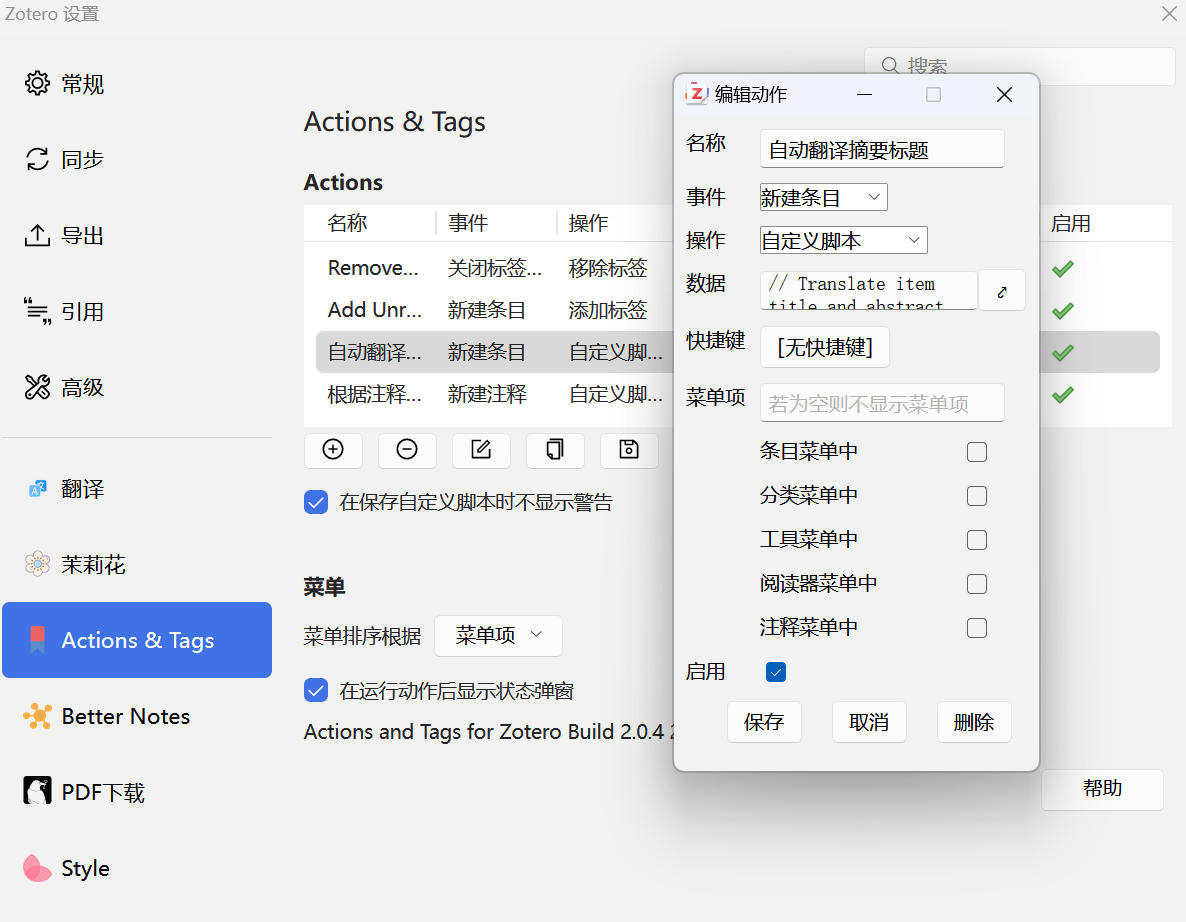
  • 自动翻译标题摘要
1
2
3
4
5
6
7
8
9
10
11
12
13
14
15
16
17
18
19
20
21
22
23
24
25
26
27
28
29
30
31
32
33
34
35
36
37
38
39
40
41
42
43
44
45
46
47
// Translate item title and abstract automatically
// Wait for abstract to be filled before translating abstract
// author windingwind, PhoenixHwang, northword
// link https://github.com/windingwind/zotero-tag/discussions/107
// usage Event=Create Item

const Zotero = require("Zotero");
if (!Zotero.PDFTranslate) {
return "[Action:Translate Title and Abstract] Translate for Zotero is not installed or disabled.";
}
if (!item) {
return "[Action:Translate Title and Abstract] Target item is empty";
}

const skipLang = ["", "zh", "zh-CN"];
const lang = item.getField("language");

if (skipLang.includes(lang)) {
return "[Action:Translate Title and Abstract] Skip due to language"
}

const title = item.getField("title");
const abstract = item.getField("abstractNote");

const titleResult = (await Zotero.PDFTranslate.api.translate(title)).result;
Zotero.PDFTranslate.data.ztoolkit.ExtraField.setExtraField(item, "titleTranslation", titleResult);

let abstractResult = "";
if (abstract) {
abstractResult = (await Zotero.PDFTranslate.api.translate(abstract)).result;
Zotero.PDFTranslate.data.ztoolkit.ExtraField.setExtraField(item, "abstractTranslation", abstractResult);
} else {
const observerID = Zotero.Notifier.registerObserver({
notify: async (event, type, ids, extraData) => {
if (event === 'modify' && type === 'item' && ids.includes(item.id)) {
const newAbstract = item.getField('abstractNote');
if (newAbstract) {
abstractResult = (await Zotero.PDFTranslate.api.translate(newAbstract)).result;
Zotero.PDFTranslate.data.ztoolkit.ExtraField.setExtraField(item, "abstractTranslation", abstractResult);
Zotero.Notifier.unregisterObserver(observerID);
}
}
}
}, ['item']);
}

return `[Action:Translate Title and Abstract] successfully translate title ${title} to ${titleResult} and abstract.`;

1730357734866

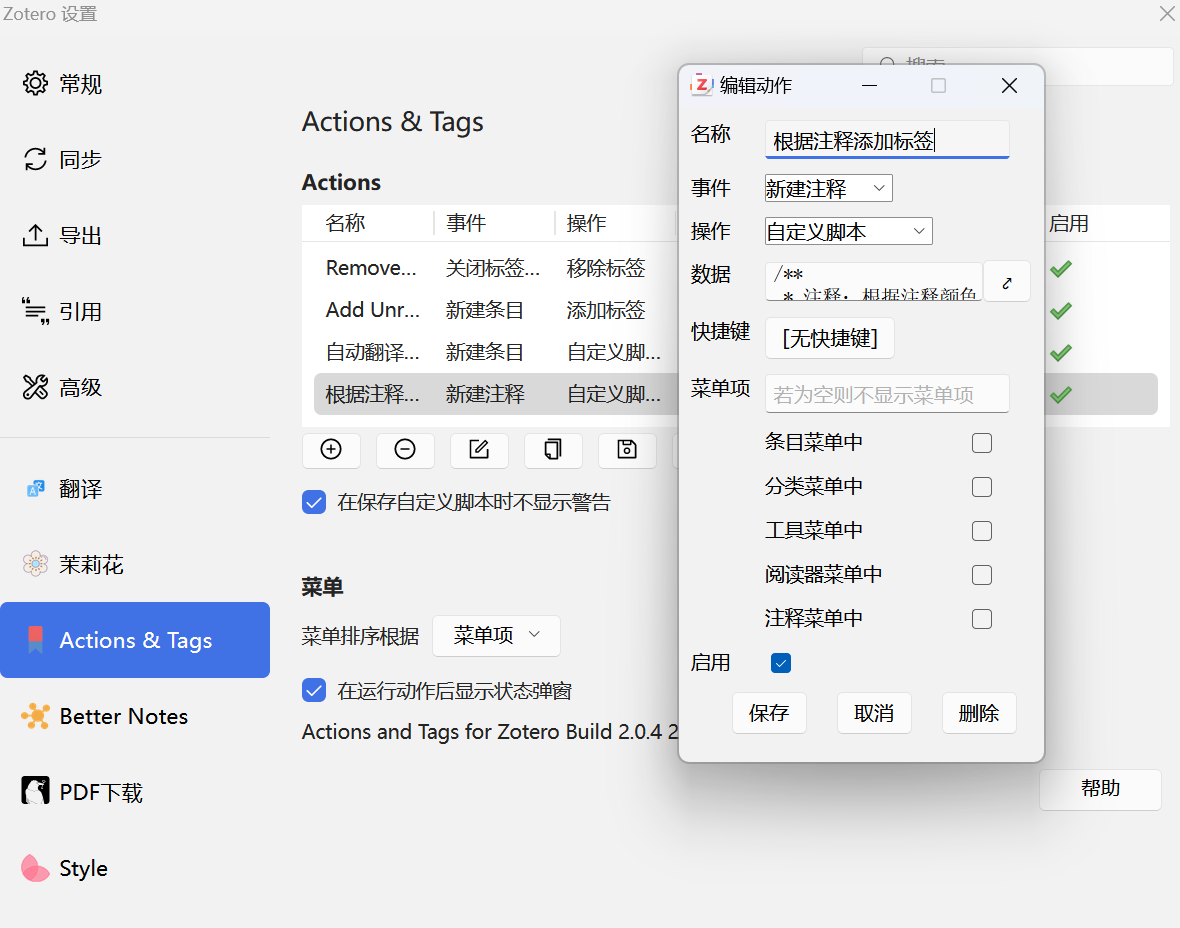
  • 根据注释添加标签
1
2
3
4
5
6
7
8
9
10
11
12
13
14
15
16
17
18
19
20
21
22
23
24
25
/**
* 注释:根据注释颜色增加标签
* @author appwcn windingwind
* @link https://github.com/windingwind/zotero-actions-tags/discussions/339
*/

// EDTI TAG MAPPING BELOW
const tags = {
"#48d1cc": "*研究背景",
"#ee82ee": "*亮点",
"#f08080": "*重点",
"#4de680": "*结果",
}

if (!item) {
return;
}

if (!item.isAnnotation() || !item.annotationColor) {
return;
}

const tag = tags[item.annotationColor];
item.addTag(tag);
return `Tag added: ${tag}`;

1730357841127

zotero-better-notes

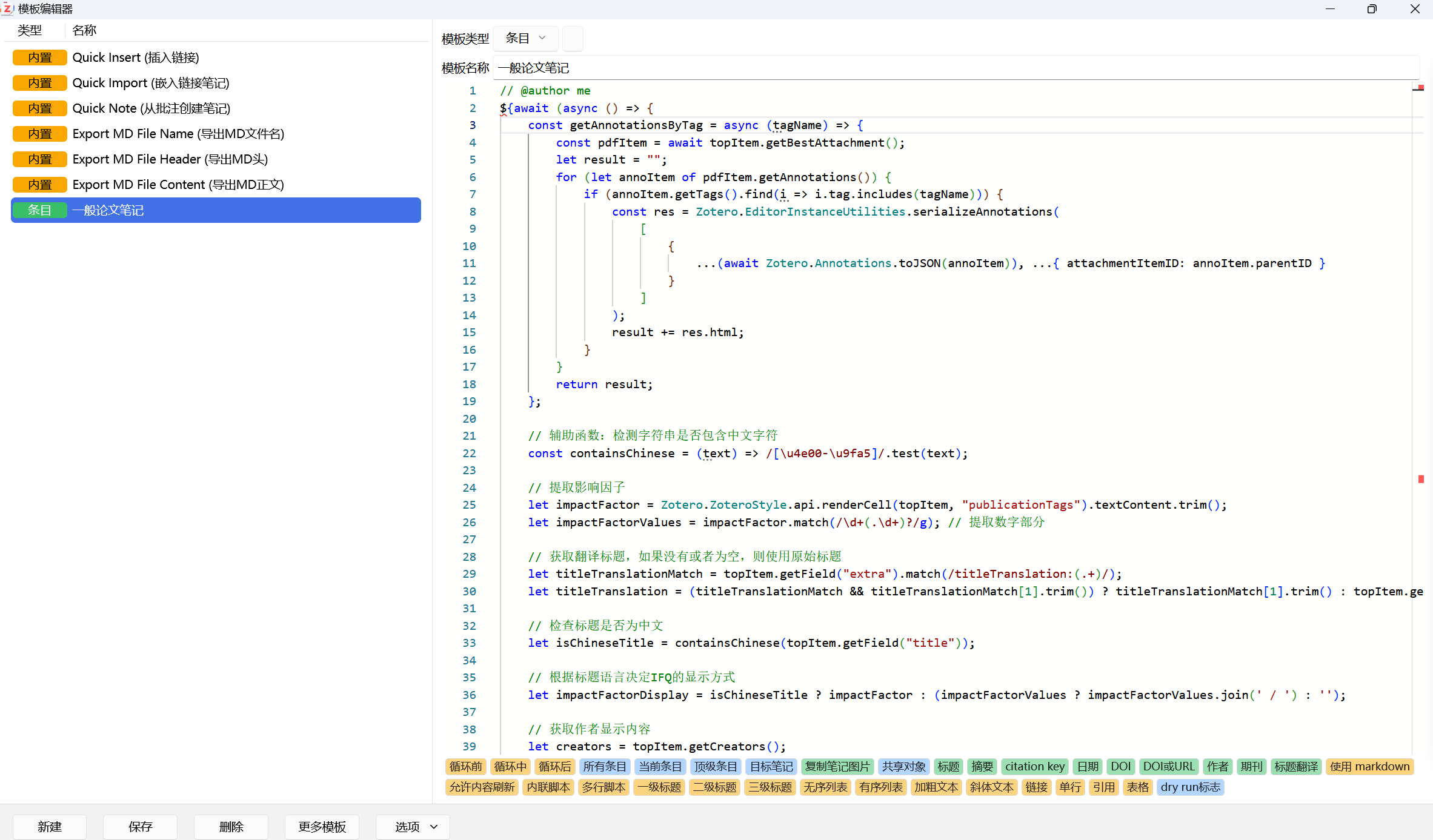
  • 笔记模板
1
2
3
4
5
6
7
8
9
10
11
12
13
14
15
16
17
18
19
20
21
22
23
24
25
26
27
28
29
30
31
32
33
34
35
36
37
38
39
40
41
42
43
44
45
46
47
48
49
50
51
52
53
54
55
56
57
58
59
60
61
62
63
64
65
66
67
68
69
70
71
72
73
74
75
76
77
78
79
80
81
82
83
84
85
86
87
88
89
90
91
92
93
94
95
96
97
98
99
100
101
102
103
104
105
106
107
108
109
110
111
112
113
114
115
116
117
118
119
120
121
122
123
124
125
126
127
128
129
130
131
132
133
134
135
136
137
138
139
140
141
142
143
144
145
146
147
148
149
150
151
152
153
154
155
156
157
158
159
160
161
162
163
164
165
166
167
// @author me
${await (async () => {
const getAnnotationsByTag = async (tagName) => {
const pdfItem = await topItem.getBestAttachment();
let result = "";
for (let annoItem of pdfItem.getAnnotations()) {
if (annoItem.getTags().find(i => i.tag.includes(tagName))) {
const res = Zotero.EditorInstanceUtilities.serializeAnnotations(
[
{
...(await Zotero.Annotations.toJSON(annoItem)), ...{ attachmentItemID: annoItem.parentID }
}
]
);
result += res.html;
}
}
return result;
};

// 辅助函数:检测字符串是否包含中文字符
const containsChinese = (text) => /[\u4e00-\u9fa5]/.test(text);

// 提取影响因子
let impactFactor = Zotero.ZoteroStyle.api.renderCell(topItem, "publicationTags").textContent.trim();
let impactFactorValues = impactFactor.match(/\d+(.\d+)?/g); // 提取数字部分

// 获取翻译标题,如果没有或者为空,则使用原始标题
let titleTranslationMatch = topItem.getField("extra").match(/titleTranslation:(.+)/);
let titleTranslation = (titleTranslationMatch && titleTranslationMatch[1].trim()) ? titleTranslationMatch[1].trim() : topItem.getField("title");

// 检查标题是否为中文
let isChineseTitle = containsChinese(topItem.getField("title"));

// 根据标题语言决定IFQ的显示方式
let impactFactorDisplay = isChineseTitle ? impactFactor : (impactFactorValues ? impactFactorValues.join(' / ') : '');

// 获取作者显示内容
let creators = topItem.getCreators();
let authorDisplay = "";
if (isChineseTitle) {
// 中文标题:显示第一作者全名,格式为“姓 前名”
if (creators.length > 0) {
let firstAuthor = creators[0];
let fullName = `${firstAuthor.lastName} ${firstAuthor.firstName}`;
authorDisplay = fullName;
}
} else {
// 非中文标题:显示第一作者姓氏并附加“et al.”
if (creators.length > 0) {
let firstAuthorLastName = creators[0].lastName;
authorDisplay = `${firstAuthorLastName} et al.`;
}
}

// 获取各部分注释内容
const 研究背景 = await getAnnotationsByTag('研究背景');
const 亮点 = await getAnnotationsByTag('亮点');
const 重点 = await getAnnotationsByTag('重点');
const 结果 = await getAnnotationsByTag('结果');
const Figure = await getAnnotationsByTag('Figure');

// 新增部分:提取 Figure 标签的内容
const getFigureAnnotations = async (item, tag) => {
let annots = item.getAnnotations();
annots = annots.filter((annot) => annot.getTags().map(tagObj => tagObj.tag).includes(tag));
return await Zotero.BetterNotes.api.convert.annotations2html(annots, { noteItem: targetNoteItem });
};

const attachments = Zotero.Items.get(topItem.getAttachments()).filter((i) => i.isPDFAttachment());

let figureRes = "";
for (let attachment of attachments) {
const annots = await getFigureAnnotations(attachment, 'Figure');
figureRes += annots ? annots : "";
}

const itemNotes = []; // 需要获取文献的相关笔记
const notes = itemNotes.filter(noteItem => noteItem.getTags().map(tagObj => tagObj.tag).includes('Figure'));
const notesWithTags = `${notes.map((noteItem) => {
const noteLink = Zotero.BetterNotes.api.convert.note2link(noteItem);
const noteLine = `<p style="color:red; background-color: #efe3da;">📜 Article Note: <a href="${noteLink}">${noteItem.getNoteTitle() || noteLink}</a></p>
<p>tags: ${noteItem.getTags().map(tagObj => tagObj.tag).join(', ')}</p>
<p> </p>`;
return noteLine;
}).join("\n")}`;

figureRes += notesWithTags;

// 生成标题,处理中文和英文情况
let res = `<h1>🔤${titleTranslation} (<span style="background-color: #B1A5E1">${topItem.getField("year")}</span>, <span style="background-color: #CBE1A5">${authorDisplay}</span>) ${topItem.getField("journalAbbreviation")} (${impactFactorDisplay})</h1>
<p><strong><span style="color: #283593">原名:</span></strong>${topItem.getField('title')}</p>
<p><strong><span style="color: #283593">译名:</span></strong>${titleTranslation}</p>
<p><strong><span style="color: #283593">作者:</span></strong>${authorDisplay}</p>
<p><strong><span style="color: #283593">期刊:</span></strong>${topItem.getField('publicationTitle')}</p>
<p><strong><span style="color: #283593">IFQ:</span></strong><span style="">

${{
let space = " ㅤㅤ ㅤㅤ"
return Array.prototype.map.call(
Zotero.ZoteroStyle.api.renderCell(topItem, "publicationTags").childNodes,
e => {
e.innerText = space + e.innerText + space;
return e.outerHTML
}
).join(space)
}}$
</p >

${(() => {
const doi = topItem.getField("DOI");
if (doi) {
return `<b><span style="color: #283593">DOI:</span></strong> </b><a href="https://doi.org/${topItem.getField('DOI')}">${topItem.getField('DOI')}</a>`;
} else {
return `<b><span style="color: #283593">URL:</span></strong> </b><a href="${topItem.getField('url')}">${topItem.getField('url')}</a>`;
}
})()}
<p><strong><span style="color: #283593">发表时间:</span></strong>${topItem.getField('date')}</p>

<!-- 本地链接 -->
<tr>
<td style="color:#193c47; background-color:#dbeedd; padding:8px;">
${(() => {
const attachments = Zotero.Items.get(topItem.getAttachments());
if (attachments && attachments.length > 0) {
return `<b><span style="color: #283593">本地链接:</span> </b><a href="zotero://open-pdf/0_${attachments[0].key}">${attachments[0].getFilename()}</a>`;
} else {
return `<b><span style="color: #283593">本地链接:</span> </b>`;
}
})()}
</td>
</tr>
<p>
<!-- 摘要 -->
<tr>
<td style="color:#193c47; background-color:#dbeedd; padding:8px;">
${(() => {
const abstractTranslation = topItem.getField('abstractTranslation');
if (abstractTranslation) {
return `<b><span style="color: #283593">摘要翻译:</span> </b><i>${abstractTranslation}</i>`;
} else {
return `<b><span style="color: #283593">摘要:</span> </b><i>${topItem.getField('abstractNote')}</i>`;
}
})()}
</td>
</tr>

<!-- 生成标签笔记 -->

<h4><span style="color: #A61B41"> 研究背景:</span></h4>
<p>${await getAnnotationsByTag('研究背景')}</p>

<h4><span style="color: #A61B41"> 亮点:</span></h4>
<p>${await getAnnotationsByTag('亮点')}</p>

<h4><span style="color: #A61B41"> 重点:</span></h4>
<p>${await getAnnotationsByTag('重点')}</p>

<h4><span style="color: #A61B41"> 结果:</span></h4>
<p>${await getAnnotationsByTag('结果')}</p>

${figureRes ? `<h3><span style="color: #A61B41">Fifure:</span></h3>${figureRes}` : ''}

`;

return res;
})()}

1730357942225


本地webdav同步到zotero根目录再内网穿透和平板同步

  • 因为坚果云的同步上次流量不够用,更新的第一天上传流量直接拉满。。。

  • 本地采用webdav同步到zotero根目录,推荐做好便携版zotero

环境

  • windows111
  • 华为平板鸿蒙4.2
  • zotero7
  • zotero beta 1.0.0-97

电脑端启用webdav

1730376575640

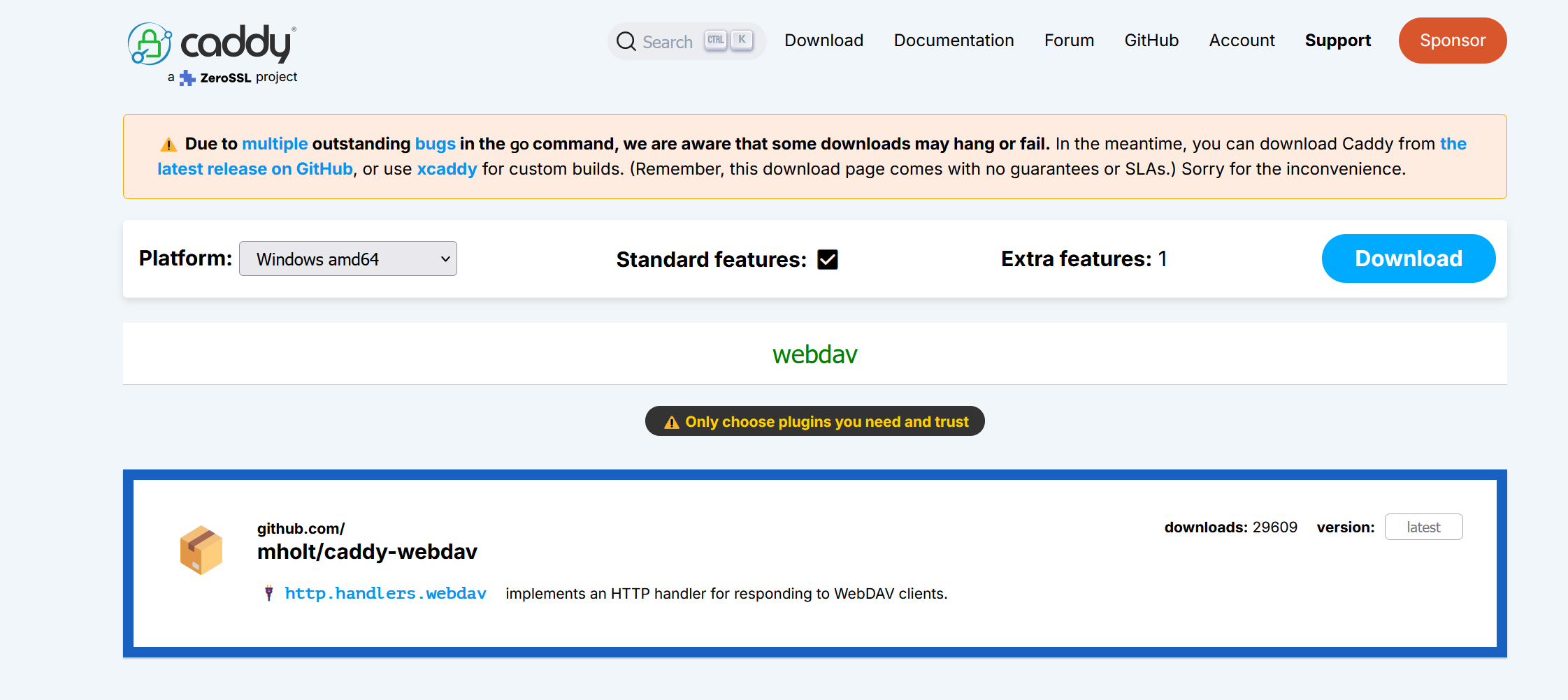
  • caddy.exe同目录新建文件Caddyfile, 写入

    1
    2
    3
    4
    5
    6
    7
    8
    9
    10
    11
    12
    13
    14
    15
    16
    17
    18
    19
    20
    21
    {
    order webdav last
    }
    :6006 {
    handle_path /files/* {
    file_server browse
    }
    redir /files /files/

    handle /webdav/* {
    webdav {

    prefix /webdav
    }
    }
    redir /webdav /webdav/

    basicauth /webdav/* {
    admin $2a$14$W0I6Ex5Y6yBUekWMQAQo.efJPjBGwg/tR9WUeMUU4tgt9SLdjZ2vK
    }
    }
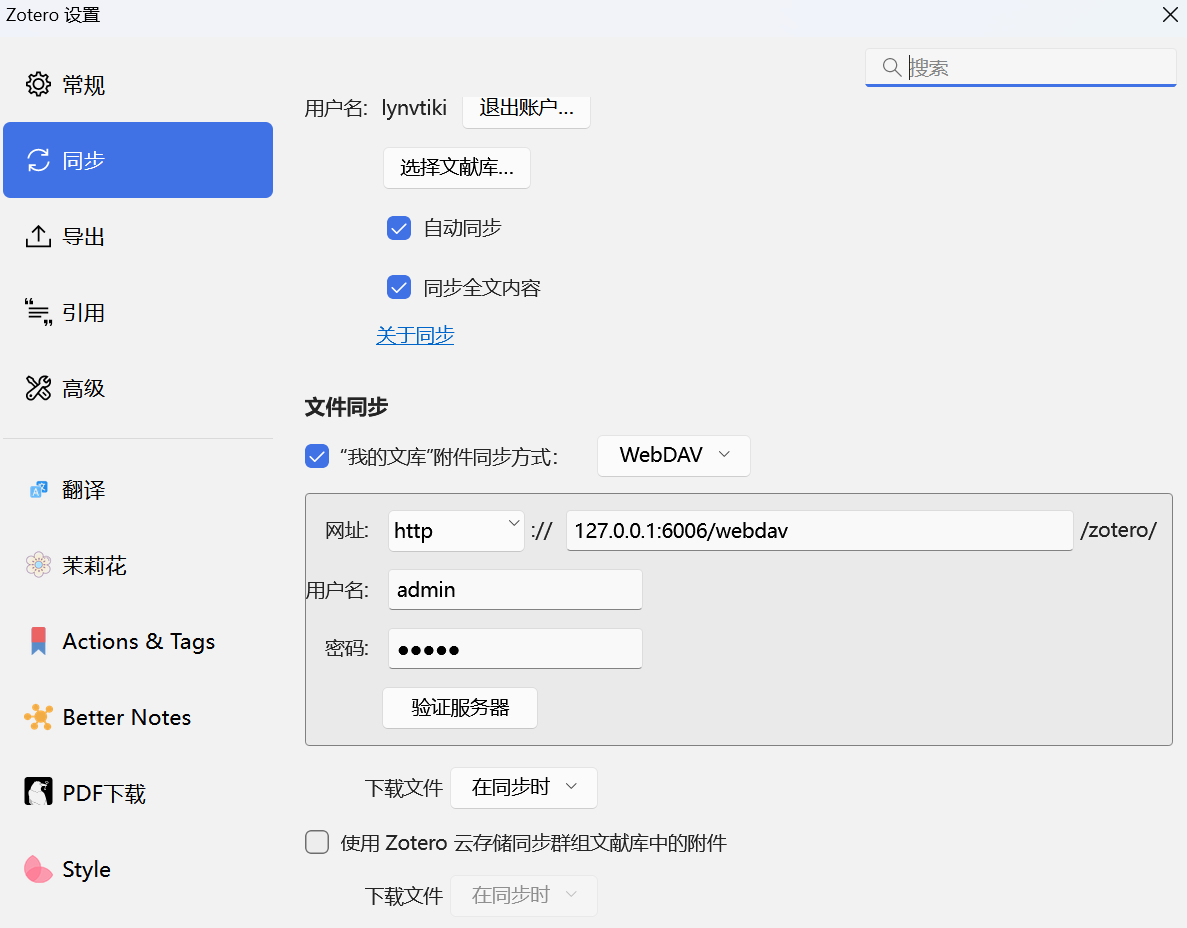
  • 端口号:6006,账号:admin,密码:admin

  • 命令行启动

    1
    .\caddy.exe run

电脑端zotero设置同步

1730809896900

内网穿透设置

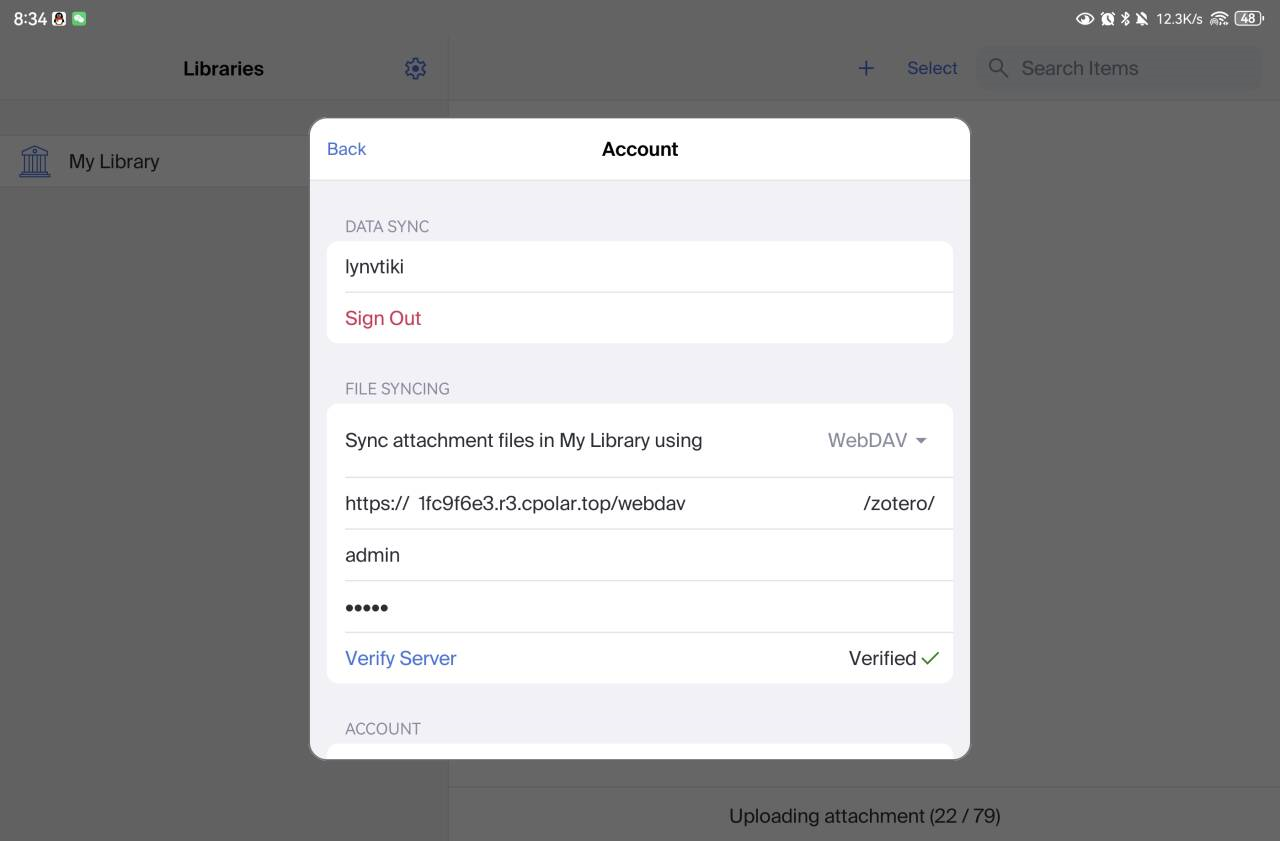
  • 内网穿透服务商推荐:https://www.cpolar.com/,不限流量,缺点域名每天会变化,速度100-300kb/s左右

  • 依据官方文档安装cpolar并在电脑端设置好

平板端zotero设置

1730809994954